2009年9月25日 星期五

噗浪 (Plurk) 的終極密技 by 《Meme -- 教學與反省》

噗浪 (Plurk) 的終極密技 by 《Meme -- 教學與反省》: "

現在網路上的當紅炸子雞在國外是 Twitter,在台灣就是 Plurk 了。

Twitter 上面有各國網友傳布的最新消息,但 Plurk 有中文版面,又方便聊天,獲得台灣網友的喜歡。

多數人拿 Twitter、Plurk 這類的網站做為一個簡單的部落格,或是用以聊天、與朋友聯絡感情,不過這些網站祇能拿來做這些事嗎?

答案當然是否定的。這類網站有簡單易用的特性,至於要如何使用就看個人的想像與需求了。我嘛,是把它們用來當作網頁跑馬燈與課程公布欄之用。

當然,你要把它們拿來做為多人共用的公布欄也是可以的,祇不過這需要一點組合技,也是我寫這一篇文章的目的。(本網站所有文章都歡迎轉寄,不用再問我了!:D )

我們先從最基本的開始,底下就是我以 Plurk 做為公布欄的做法:

資訊課程 & 課程公布欄

生物課程 & 課程公布欄

上述兩個 Moodle 課程中,我都內嵌了 Plurk 的外掛做為公布欄,很多部落格也有這樣的區塊,這我們就不再多說。但是眼尖的人應該有發現,這兩個課程用的是不同的 Plurk 帳號!

是的,我針對我自己撰寫的不同課程,分別申請了不同的 Plurk 帳號來做公布欄。不祇課程,我還有工作日誌帳號、閒聊帳號……好幾個 Plurk 帳號,依據不同的需求,我在不同的帳號間發布訊息。

一定會有人問:『這樣不是很麻煩嗎?要記一堆帳號、密碼,還得不停的登入、登出才可以在不同的帳號間發布訊息!太麻煩了!!』

繼續看下去,你就知道一點也不麻煩,而且非常簡單!:)

為了簡化我在 Plurk 上發布文章的步驟,我申請了 hellotxt 的服務來管理眾多的 Plurk 帳號。

當你申請好 hellotxt 的帳號並登入後,可以看到底下的畫面:

hellotxt 登入後畫面

在畫面左方有個簡訊傳送區,你想要傳到 Plurk 的內容就寫在這邊。畫面右方是帳號清單,你所有的 Plurk 帳號都會在這邊出現。

比方說我要傳個測試的內容到某個 Plurk 帳號去,我就可以將內容填入簡訊傳送區,再勾選要傳到哪個帳號,按下 Update Status 按鈕,就發送成功了。

傳送測試內容至某個 Plurk 帳號去

按下 Update Status 按鈕後,訊息就出現在勾選的那個 Plurk 帳號中了。

在 Plurk 中出現剛剛的內容

你祇要在 hellotxt 做做勾選的動作,就可以在不同帳號中發表訊息,完全不需要在 Plurk 畫面中登入、登出,所以非常省事。

你可以一次勾選許多個 Plurk 帳號,讓 hellotxt 一次幫你發送到多個帳號去;或是依據所需,勾選適當的 Plurk 帳號 (比方說要公告在生物課程,就勾選生物課程的 Plurk 帳號) 來傳遞訊息。

那麼,要如何將 Plurk 帳號放進 hellotxt 裡集中管理呢?這我們就需要按畫面右上角的 setting 進到 hellotxt 的設定畫面中進行設定。

按 setting 進行設定

hellotxt 的設定畫面有三大區,分別是已加入的帳號、可接受 hellotxt 傳訊的網站,以及傳訊方式設定。

hellotxt 的設定畫面

我們現在要在 hellotxt 中加入一個新的 Plurk 帳號來做管理,所以選擇新增 Plurk 帳號的功能。

新增一個 Plurk 帳號至 hellotxt 中

填入 Plurk 的帳號與密碼,並設定預設就勾選這個帳號傳遞訊息。如果讓 Default 的綠色勾勾亮起來,那麼以後傳送的訊息都會送一份到這個帳號來,當然你也可以在傳訊畫面中手動將勾勾取消掉。:)

填入帳號,並設定是否預設勾選

按下 Save 按鈕後,就加入成功,你可以將多個 Plurk 帳號都加入,方便日後傳訊。

如果這個公布欄是你個人要使用的,應該做到這邊就可以了。但如果你是要做為單位的公布欄,比方說做為學校公布欄,那麼還要再多一點設定。

以學校做例子好了,教務處、訓導處、總務處都會有把訊息放在學校首頁上公告的需求,所以你必需讓這些單位的人也都能夠放公告。否則你就等著一天到晚接電話:『ㄟ,Yukie,你幫我把○○○○以及□□□□放到學校公告區去!』吧!

為了讓自己不要累死,我們要讓各單位可以自行公告。不過,我們面臨的狀況不祇如此,我們要讓各單位可以放公告,但是又不能給他們 hellotxt 或是 Plurk 的帳密,否則哪天有人心情不爽,給你惡搞一下你就麻煩了。

不給帳號、密碼,各單位怎麼公告、怎麼發布訊息到 Plurk 去啊?

請注意,本篇文章最重要的密技來了!

有沒有注意到,在 hellotxt 的傳訊方式設定區中有個 Email 傳訊啊?是的,我們就需要它!點一下 Update by Email 按鈕,進入設定畫面。

進入 Update by Email 的設定畫面

進入 Update by Email 的畫面後,在畫面中央有個 Email Address,祇要寄封信到這個 Email Address 去,hellotxt 就會幫你把信件內文傳送到 Plurk 去。

Update by Email 畫面

你祇需要把這個 Email Address 傳給各單位,請他們要發公告時,自行寄信到這個 Email 就好了。帳號、密碼都不用提供,以確保安全。

如果今天這個 Email Address 不小心被流傳出去,公布欄上開始多一些亂七八糟的內容那怎麼辦?

不用擔心,按下Regenerate 按鈕,重新產生一個新的 Email Address 就可以了。產生新 Email Address 後,舊的那個就作廢了,別人再也無法惡搞你們單位的公布欄。

當然,產生新的 Email Address 後,要記得通知各單位更新,否則大家也都不能發公告了!:)

產生的新 Email Address

因為別人祇有 Email Address,沒有 Plurk 帳號密碼,所以你可以確定改過 Email Address 後不會有新的惡搞內容出現了,這時你可以好整以暇的去 Plurk 上把別人惡搞的內容一則一則刪除。

當然啦,如果是 hellotxt、Plurk 帳號密碼設定的太簡單被別人破解那換 Email Address 是防不了的。所以為了安全,密碼要設定的複雜一點,這樣我們才可以高枕無憂!:)

內文有點長,怕大家搞糊塗了,所以我幫大家做個重點整理,希望對你有幫助。

要用 Plurk 做為公布欄,你可以這麼做:
1、申請 Plurk 帳號,可申請多個帳號備用
2、申請一個 hellotxt 帳號
3、在 hellotxt 中填入 Plurk 帳號資料
4、以後都利用 hellotxt 傳簡訊至 Plurk 中
5、如果需要提供給多人共同使用,則開啟 hellotxt 的 Email 傳訊功能

ps1:

補充阿欣老師 & rancilio2000 老師的發現,在 Gmail 中要將信件設定為 UTF-8 才可以正常顯示,否則中文會變亂碼。

ps2:

要用 Email 更新的話,寫在信件內文的內容才會發布到 Plurk 去,寫在標題是沒有用的唷!如果有幫各個帳號設定 tag 的話,可以發送給特定 tag 帳號。

比方說有一類的帳號設定為 curriculum,則信件內容以 #curriculum 開始的話,這一類的所有帳號都會更新簡訊。

如果是自己用的話,不需要寄 email。用 Gtalk、MSN 都可以!!而且也都支援 #tag 功能。但 tag 不能用中文。

"

彎彎究竟會花落誰家?由一個噗引發的BSP搶人大戰 – MMDays

彎彎究竟會花落誰家?由一個噗引發的BSP搶人大戰 – MMDays: "

Posted by Mr. Friday

事情是發生在昨天下午,彎彎在Plurk上丟了一個「噗」。沒想到這個噗,竟然成為當天網路上的熱門話題。原文是這樣子的:

乍看之下好像是很普通的一個噗,但…等一下,這個人是彎彎耶,她還需要繳VIP費?而她正在考慮換BSP的可能性?Oh my… god. 接下來呢,果不其然立刻爆出四百多則留言,建議彎彎可以轉往其他BSP,例如Pixnet、blogspot等等,就是不見幾個人建議彎彎留下來,有的人甚至開始搖旗吶喊了。

雖然彎彎本人似乎很低調,但是大家私下都稱她為部落格天后,自部落格觀察成立以來,彎彎就一直蟬連台灣區部落格第一名至今,在台灣部落格界可說是第一指標性的人物,甚至有人說彎彎即將破1億人次,請別再叫她部落格。像這樣的大戶如果換了BSP,肯定是頭條大新聞。

好戲還沒完。有位無名社群經營主管看到此噗後,在MSN上跟彎彎聯絡。但是一時失言,就變成這樣子了:

說話的酪梨壽司恰好正是從無名搬家到Pixnet的著名案例。此噗一出,把討論的焦點轉移到了無名的服務品質上,這麼一來又勾起眾人的不好回憶,所以即使後來無名的主管出來道歉,也還是止不住對無名的負面留言…

BSP_fight_6

這兩個討論串延燒了整個下午,許多名人紛紛出來看好戲。真奇怪,大家怎麼都不用上班?

BSP_fight_5

現在這兩個討論串還在不斷的增長當中,有興趣的人不妨可以點進去看〈彎彎、酪梨壽司〉。

我講一下我為什麼覺得彎彎這則噗值得討論好了。彎彎雖是知名部落客,但專長是圖文漫畫而不是網路架站,因此對於許多科技部落客熟悉的「如何申請個人網域」、「如何架站」,甚至連「如何搬家」可能都不是非常了解,這點應該很貼近一般的網友。正因為這點,如果彎彎真的搬家了,她許多的忠實讀者應該會有以下幾種反應:

  • 無名應該真的做得不好,所以連彎彎都願意放棄自己的舊部落格網址累積的人氣,跳槽到新的BSP那裡去!
  • 新BSP是不是有提供什麼更好的功能,連彎彎都要去!
  • 連彎彎這樣不熟悉技術的部落格都可以順利轉換過去,那我應該也可以!

彎彎的指標性意義我想大家都很清楚。如果像彎彎這樣理論上服務比較週到的大戶,約滿都考慮搬家了,那…其他理論上服務比較不週到的小部落客呢?

換個角度,我們來看無名。雖然最近一年被Yahoo購入以來,無名的負面新聞漸漸地少了,但是服務口碑是需要長年經月累積的。對於無名的人員來說,彎彎現在雖然還沒有決定是否搬家,但是彎彎已經明擺著正在「考慮」搬家,那麼無名過去4年多對這位超級VIP的服務,基本上就已經是打了個大X的了。既然過去無法改變,那麼現在就更應該積極留住這位大戶了。「如果是在意VIP費用或是其他的問題…」這段話雖然有禮貌,但是誘因似乎還不夠,而且好像顯得對方很在意錢的樣子。最好是出人意表地提出一個彎彎都沒想到的貼心服務更好。

至於其他家BSP,相信Pixnet、Yam應該也都很希望彎彎跳槽,尤其Pixnet的介面風格跟無名比較接近,網路上也查詢得到詳盡的搬家教學。當然,像彎彎這樣的VIP級客戶,搬家這件事應該會有人願意代勞才是…,所以彎彎如果要選擇,重點應該會落在這個新BSP介面是否容易上手、圖文部落客修改網頁畫面是否方面、網站是不是更快更穩定、是不是有其他家BSP沒有的功能?至於錢嘛…應該根本不是個問題吧?

另外,對於事件本身,我有一點看法。或許在網路時代,大家習慣了隨手把自己最直接的感想貼在公告欄上,並即時觀看大家的反應,以前是BBS,現在是twitter或plurk。這是一種快速的溝通方式,但根據情況,不見得是最恰當的回應方式。對於公司來說,第一線面對客戶的員工發言之所以重要,是因為顧客不會只看到「一個人」,而是「整間公司」。因此許多時候,即使只是客服人員的個人失言,顧客也會留下「你們整間公司都這樣」的壞印象。這點可以從bestguy的對話看出,或許bestguy的出發點是善意,但是在MSN表達上一有失誤而被揭露出來,網友立刻就得到「無名小站的客服如此如此回答」的感覺。其實我倒覺得bestguy太急了,MSN也不算是很正統的溝通工具,我建議bestguy應該在釐清能提供彎彎什麼樣的服務之後,寄一封正式的email向彎彎正式說明才是。

彎彎的一則噗,意外地引起BSP的搶人大戰,也讓大家看了一場好戲。究竟彎彎會花落誰家呢?部落格天后自己不急,倒是我們這一堆看熱鬧的鄉民自己急了起來…

Update : 酪黎壽司與bestguy後續的討論風波與感想,請參考沒有「客服」不了的事──彎彎事件感想續集

"

微網誌上訊息是如何發送的?以 Twitter 為例,一窺即時搜尋的可能性 – MMDays

微網誌上訊息是如何發送的?以 Twitter 為例,一窺即時搜尋的可能性 – MMDays: "

Posted by Mr. Friday

美國知名的部落格 ReadWriteWeb,日前發表了一篇來自 Infoharmoni 這家自稱研究即時搜尋的 startup 的文章,看了以後很有回到學校裡面和教授討論paper、研究理論的興奮感覺。趁感覺還在,趕快地跟大家分享一下。

Twitter推出即時搜尋功能之後,一時之間吸引了相當多人的目光。可是就如同我曾經在 Twitter 引爆即時搜尋風潮,但是目前的即時搜尋到底解決了什麼問題?這裡面提到過的,其實現在的即時搜尋還有很多可待改進之處,其中一個大問題就是如何將訊息排名。我當時是這樣寫的:

排序是一個搜尋引擎的重要課題,因為人們只想要看『重要的資訊』,沒有排序過的資訊根本是一堆垃圾。而像Twitter這樣用時間排序,也不能說是不行,只能說是一種偷懶的方法而已。

即時訊息的排序,或者說Ranking,我們要怎麼做呢?或者,除了排序,我們還能從即時訊息裡面挖掘出來什麼?要回答這個問題,我們應該先觀察一下即時訊息的資料特性,以及它是如何傳播的,會有比較清楚的頭緒。

研究標的

iran_revolution_jul09a

上圖是今年六月伊朗大選時,在Twitter上討論”Iran”這個關鍵字的tweet,單位是一小時。可以看得出資料量相當龐大,最高峰時每小時的討論量可以超過8000則推,多到你根本看不完。不過也因此,如何在當中篩選重要的推,並以適當的方法呈現出來,就變得格外有價值。

訊息特性

iran_revolution_jul09b

一個熱門的新聞關鍵字,隨著更多新訊息的出現,會隨時改變它的資訊內容,以及跟其他關鍵字的交互關係。這樣講有點抽象,我舉個例:如果我們現在去plurk上面,搜尋”戴爾”這個字,那我們可以大概的觀察到討論內容的關鍵字會隨著新聞的不斷出現而改變:

  • 6/26:螢幕、好便宜
  • 6/30:說好的螢幕呢
  • 7/4:電腦、E4300、明翰、泡沫網
  • 7/7:總經理、折價券

光是從新關鍵字的出現,我們就可以察覺到有新聞有新進展出現,研究也證實了這一點。上圖是 infoharmoni 研究伊朗事件的相關 tweet 時,發現每當伊朗選舉有新的進展/消息出現時,與 #iranelection 一起出現的關鍵字就會改變,而且在事件發生後的當下會大量出現。

傳遞路徑

那Twitter上面訊息是怎麼傳遞的?誰看了你的推?這個訊息原是有點難回答,不過要感謝”retweet銳推”這個功能的出現。Retweet 這個功能像是說『我看了你訊息,而且我也推薦這個訊息,要給我認識的朋友看』,因此作為即時訊息傳遞路徑的觀察對象,可以說再合適也不過了。

如果A、B這兩個人分別代表地圖上的兩個點,而A推了一則來自B的推文,就等於在A點與B點間建立一條連線,那麼可以用下圖代表伊朗事件裡,Twitter上即時訊息的傳輸關係:

iran_revolution_jul09d

這張圖真是再清楚不過地說明了伊朗事件Tweet的特性了。

首先,只有極少數的五個人〈五個白點〉,他們的推會大量的被其他人〈周圍的紅色圓點〉retweet。這相當符合我之前寫過的另外一篇:淺談網路世界的 Power Law 現象〈五〉──Plurk的名人效應與酪梨壽司的一千噗 裡面談到的現象,就是微網誌裡有相當大的群聚效應,群聚在 Infoharmoni 所謂的『Information Elite』的這一小撮人上。

再者,雖說是群聚效應,但是這張圖的群聚比例未免也太懸殊了,看起來就像是五個不同的人、對著五群各自不認識的群眾發言。如果這五個人的發言效應這麼大、又都是針對同一事件發言,那應該會有很多網友是同時會關注這五個人的推才是。但從圖表來看,同時關注這五個人的網友〈位在中間的點〉反倒不如各自的關注者多?怎會這樣?

Infoharmoni 認為,這是因為新聞事件與媒體報導的關係,Twitter 上關注伊朗的人突然爆增,以至於這群人還來不及形成完整的社交結構所致。

iran_revolution_jul09e

相比之下,這是分析同時提到伊朗與 ”obama” 兩個關鍵字的RT關係,所畫出來的圖。你可以從圖上觀察到,雖然仍然有群聚效應,但是單一支持者的規模小得多,連線間呈現複雜的交錯關係,代表這些討論者之間已經形成一個比較完整的社交結構。猜想,或許在伊朗事件裡提到 obama 的人,多半是美國人,由於他們使用twitter的時間比較久,所以在上面的社交結構也比較複雜些。

分析即時訊息可以做什麼?

這幾張圖表不只是炫而已,這篇文章已經相當清楚的暗示了 Twitter 上的即時訊息可以做什麼應用出來。前面關鍵字變化的部分,讓我想起了 Google News 這種自動偵測新聞事件、判斷新聞的半衰期、自動排序新聞的服務。而後面關於 Retweet 的研究,則跟 Google 最擅長的超連結分析與搜尋有異曲同工之妙。

但是 Twitter 比起一般的網頁,更為棘手的是新訊息會一直不斷湧入,因此如果要在上面發展搜尋或 Data Mining 的技巧,必須考慮如何快速更新搜尋結果的問題。

總而言之,即時訊息的分析與搜尋、甚至從中挖掘出隱藏的社交結構,可以說是目前最熱門的話題之一。透過 infoharmoni 的資料特性分析,或許能一窺即時搜尋的可能性。infoharmoni 稱,如何動態地、有系統地挖掘出隱藏的新社交結構,可能是個價值百萬美金、甚至是上兆美金的大哉問。那該怎麼做?或許先仔細研究  Twitter 上的訊息特性,就能有一些頭緒。

"

I am here.: 10張令人驚奇的網路資訊圖表(Infographics)

I am here.: 10張令人驚奇的網路資訊圖表(Infographics): "今天看到一篇【10 Revealing Infographics about the Web】,裡面介紹了10張關於網路的資訊圖表,覺得還蠻有趣的,分享給大家。


Web Trend Map是把網路上有名的網站或公司用東京交通系統的方式來表示,根據該網站或公司的收入、名聲、流量等等當作依據來畫出每條路線,其中越高大的當然代表其的地位越突出:


和真正的東京交通系統比起來是有那麼一點相似啦XD:


這是BusinessWeek所做的一個調查圖表。主要是美國地區從事從事網路活動的主要族群的年齡分布。最活躍的是18-26歲之間的年輕人們。


Internet Traffic顯示了各個國家的上網人口及比例,可以看到中國雖然只有百分之17的人口上網,不過由於其基數相當大,所以還是躍升為第一大的網路使用人口國家:


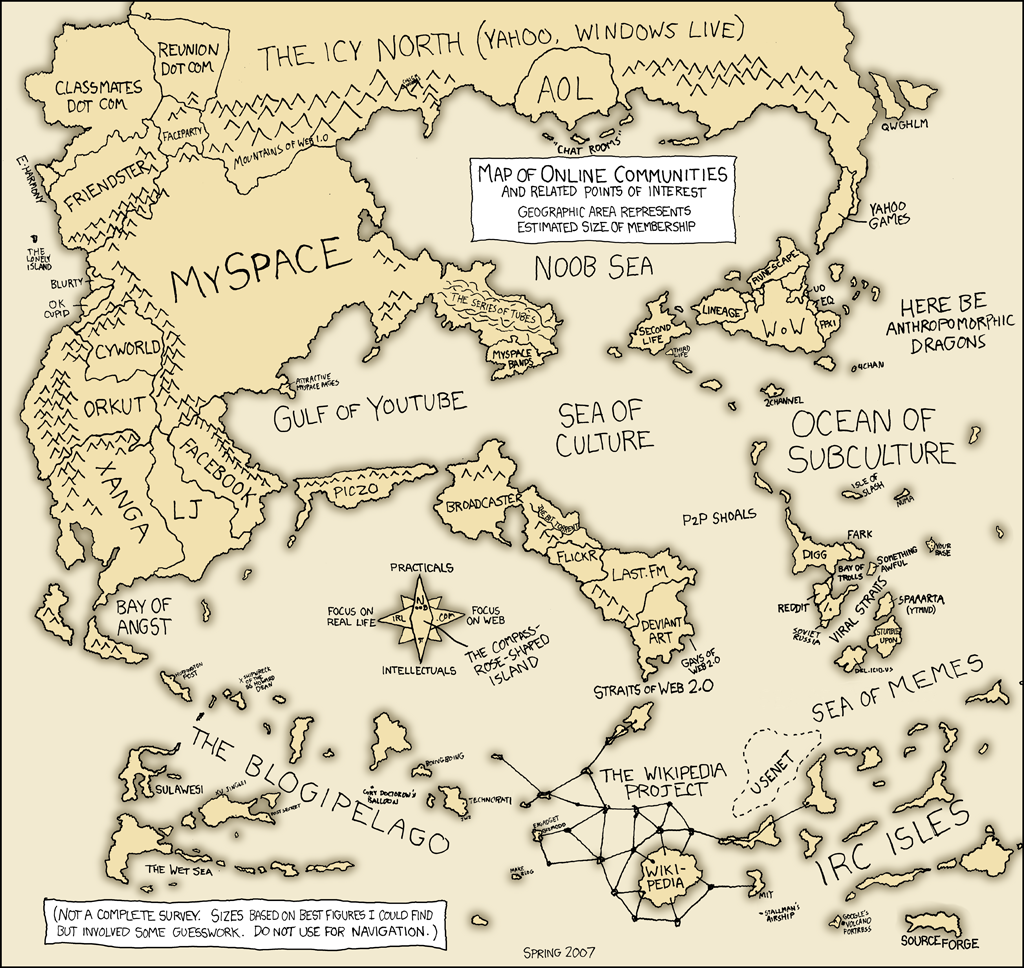
這是用詼諧加諷刺的風格來描述每個地區最熱門的網路服務(我怎麼找不到台灣...):


這個圖表顯示了在twitter誕生之前和之後訊息傳遞的不同點。


在沒有twitter之前,一個事件發生之後,要等一段時間才會在線上媒體、廣播、電視新聞等媒體出現:


這是有了twitter之後的訊息傳遞圖,可以看到twitter是相當即時(Real-Time)且快速的就可以把訊息傳遞出去:


上面所列的時間只是個參考,這裡要表達的是twitter這樣的服務比起傳統的媒體來說,在傳遞訊息的速度上要快了許多。


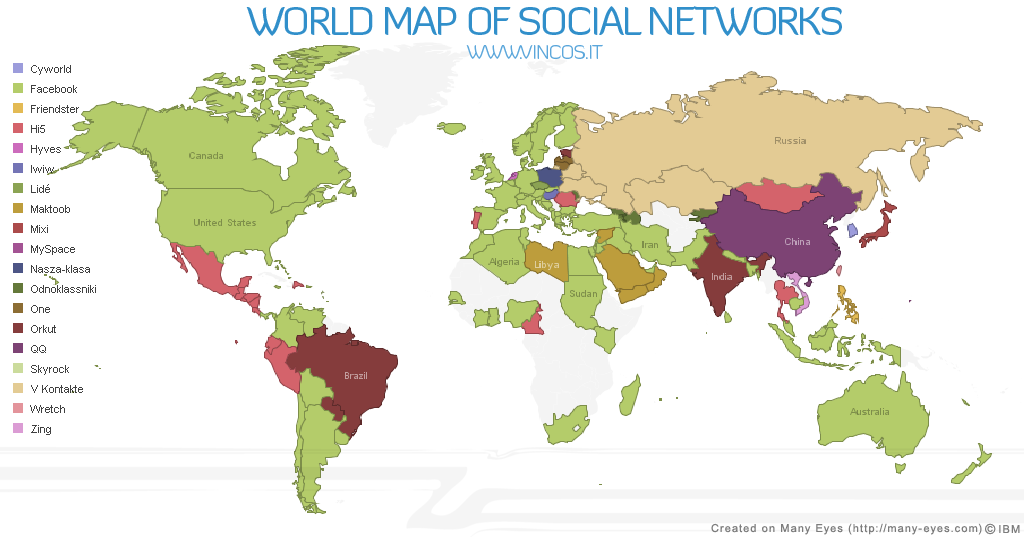
World Map of Social Networks是從Alexa和Google Trends蒐集資料,來統計每個國家最熱門的社交網路服務。美國是Facebook的天下,不過台灣好像不太準XD:


這是一張互動性很高的圖,呈現的方式很酷,一開始會顯示這樣的圖:


在上圖按一下滑鼠之後就會跑出整張圖表,用來表示一篇部落格文章如何從部落客到讀者的資訊傳遞路線:


Repetitive Website Intros Examined的作者認為許多的網站的介紹頁(一進去的首頁)都是千篇一律毫無新意,只用了很炫的色調或設計,但是內容乏善可陳,所以他就針對50 Inspirational Website Introductions.這篇文章所提出的50個該作者認為【鼓舞人心】的網站介紹頁做了一些統計,發現他們用了許多重複的字眼。Repetitive Website Intros Examined的作者用了這樣的統計圖表來顯示:


這是一個PDF表,他簡單整理了從1980到2010年之間行動上網的發展表:


Submarine cables顯示了世界上的網路海底電纜的分布圖,可以看到台灣的不愧是網路大國,佈的線路其實算很多的XD:


"

Yahoo信箱大開放 社交功能吸網友 - 網路衝浪 - 線上漫遊 - udn數位資訊

Yahoo信箱大開放 社交功能吸網友 - 網路衝浪 - 線上漫遊 - udn數位資訊: "Facebook全球用戶突破3億人,在台灣更有爆炸性成長,網路業者今宣布將信箱升級改版,也將具備社交功能,新增「社交即時動態」和「開放應用程式」兩大功能,企圖以更多互動程式吸引網友黏住不放。"

Google Wave: You need to pay attention to this. - Jason Kolb re: the Future of the Internet

Google Wave: You need to pay attention to this. - Jason Kolb re: the Future of the Internet: "

Google Wave: You need to pay attention to this.

So here's the deal with Wave:  If you deal in technology, and you get this one wrong, you'll miss the boat.  And it's a big boat.  If, on the other hand, you get this one right, you have the potential to do some incredible innovation.

In a nutshell, this is the next revolutionary leap in Internet application architecture.  Maybe the first truly revolutionary leap since HTTP itself.

I've been wanting to write this post for a while, but first I wanted to read fully thru and digest the specs and available code.  I haven't done any posts about XMPP for quite a while, but you're going to start hearing a whole lot about it, and not just from me.

What is it?

Ok so what exactly Google Wave is can be confusing, because there are three parts:  the protocol, the server, and the client.  A lot of people are really going to miss the boat here if they don't keep the distinction between the three in mind, because I see a lot of people focusing on the wrong parts.

The Protocol

WaveAndXmpp At its core, Wave is an extension to the XMPP protocol.  This is the REALLY important part.  Here I'll back up for a moment for a little background on XMPP.  

XMPP is a protocol which describes communication.  It models communication between two nodes on a network.

Now, communication can take many forms, and XMPP accommodates many of them.  It also supports different types of conversations:  presence, notifications, subscriptions, back-and-forth--these are all modeled by XMPP.  And it supports a wide variety of communication TYPES as well:  video, audio, text, and so on.

I hear people mistakenly talking about Wave as immature or new technology.  It's not.  XMPP has been around since 1998, being developed and actively worked on for almost 12 years now.  It's been approved by the IETF since 2004.  

Although it's been mostly used for chat, that's only the tip of the iceberg when you dig into this protocol.  I'm still pretty flabbergasted that this protocol hasn't been used more than it has, and I'm excited to see somebody finally tapping into its potential.

I'll touch on what Google has brought to the table with the protocol in a minute, but suffice to say that if Wave takes off as I hope it will, the full power of the XMPP protocol will finally be available as a core piece of application architecture.  This is the real game-changer here, and what you need to be thinking about.

The Server

The server (a "wave provider") is a modified Openfire XMPP server that understands the Wave protocol extensions.  Openfire has been around for a while too.

While wave providers are used for storing and server XMPP content in Google's implementation, there is a lot of potential in turning existing applications into wave providers as well.  Any existing server-based content can be used as the basis for a wave, so just about any application out there right now has the potential to extend its existing functionality by offering its contents as waves.

The Client

Ok, this is probably what you've seen videos of.  It's a wave client because it speaks wave protocol to wave providers.  

Google_wave

What Google has done is develop the first really full-featured XMPP client, which also uses some of their new XMPP extensions to facilitate things like character-by-character updates.  They've developed an incredibly sexy client, and I'm glad about it, because a sexy client like is what's required to sell an innovation this large to both the mass market AND the technical community.

What Google has done, exactly?

So what exactly has Google done to the XMPP protocol?

A couple of things:
  • It recognizes a conversation as data, and stores the data in a persistent way that can be easily referenced over time.  Conversation storage and persistence is a huge gaping hole in enterprises right now, which you'll nod your head in agreement with if you've ever scoured a wiki for information or cleaned out your inbox because it got too big.
  • It makes XMPP conversations secure and scalable.  By building in synchronization protocols, conversations can take place distributed across the network instead of at specific central servers (which is how wikis, blogs, and microblogs operate).
  • It describes a way to replicate content over a large network so that it's available on a wide scale while still being fast and synchronized.  Data replication on a global (but as-needed) scale, very cool. 
  • It integrates a very simple and elegant security model which operates on an as-needed basis.  I've blogged about this in more detail before here. 
These were some needed additions to XMPP, and really describe some of the peer-to-peer operations that I've been looking for for a long time.

Why is this so interesting?

XMPP.  In case you haven't noticed, I'm a big fan.

XMPP is so versatile that if it becomes widely adopted it will be to the Internet what HTTP was:  a platform for new types of applications.  And where HTTP as a platform is a server-centric model, XMPP is capable of peer-to-peer communication.

Remember what happened when everyone got HTTP clients (they're called browsers :) ?  The Internet exploded.  Well, if everyone gets a full-fledged XMPP client I think you can expect roughly the same thing to happen.

One of the most fascinating features of XMPP is the way things are addressed.  EVERYTHING is addressable over the network. You can talk directly to ANYTHING, and ANYONE.  I can't stress how big of a shift that would be from the current model.  It's HUGE.  I wrote a whole series of posts on this a few years ago, and it's just as exciting now as it was then.

Let's take a step back and think about this for a second.  I'll probably do another post just on the addressing scheme at some point because it's so key, but it's worth a brief recap.
  • Right now I cannot send text directly to your instant message account (unless you're using an XMPP-based client), I have to send the message to your IM server which relays the message to you.
  • I cannot send audio directly to your phone, the phone company has to route it there. 
  • I cannot share a picture directly with your Facebook account, I have to sent it to Facebook first to be carried on to you.  
  • I can't send a file directly to you, I have to put it on a share or email it to you. 
(Not to mention the fact that these are all disconnected, you can't combine these into a single message stream.  XMPP addresses that problem very nicely, as the wave client shows.)

XMPP removes these intermediaries from the network.  Social networks and proprietary transports no longer have an exclusive license to deliver content, the clients talk directly to one another.

Do you see the difference?  There are no longer social networks or any other type of networks required to relay the communication, we are now down to exactly 3 components:
  1. Clients 
  2. Storage 
  3. Applications 
Of course there is always the underlying dumb pipes that transport the data, but from a functional perspective the network has been normalized out of importance.

Clients can be whatever we need them to be.  It can be the Google wave client, it can be your phone, it can be a desktop app.  These will evolve over time, but the Google client is a fantastic starting point, certainly light years ahead of anything else that's available today.

Storage becomes a utility, something you pay for as you go.  I already use this model myself for backups, I shoot them up to the Amazon cloud and pay for the amount I use.  As time goes on my communication--audio, video, pictures, text--will be stored there as well, and I'll use it in my waves as needed.  (Note that waves do NOT embed this content, they link to it and the client downloads and renders it in place.)

And the applications.   This is really exciting, because just about every application in existence will be transformed by this quantum shift in the network topology.  Applications now interact with your client and provide input to your communication stream, and output to your storage.  They will become a facet of your communication, not a completely disconnected activity.  You will communicate with apps much in the same way that you communicate with people, and they will communicate with you.

Take CRM and ERP systems for example.  Instead of customers emailing you about a sale and then sending purchase orders, it will be part of the "sale wave".  The entire sale, from start to finish, will be encapsulated in a single wave, bringing individuals in and out of the conversation as need.  The ERP and CRM platforms themselves will be participants in this conversation, recognizing the purchase order, executing the workflow, processing the order, making the order details available to manufacturing or delivery in a sub-wave, and then making the receipt available to the customer and the sales team.  Your CRM Whether you approve the purchase order from your desktop, your phone, or a point of sale device, makes no difference--they can all be directly addressed and participate in the conversation natively.

That's just one example off the top of my head, but I truly believe that every software application in existence will eventually need to be re-architected to be much less application-centric and much more communication-centric.

The Bottom Line
This is no longer pie-in-the-sky stuff like it was when I was first writing about it.

I have seen nothing else out there that rivals the XMPP/Wave protocol for the sheer richness of the conversation that's possible, not to mention the fact that it can easily turn into a bona-fide platform for next-generation applications.

The danger, then, is that you ignore this and it takes off.  You and your application will be shut out of this rich, real-time collaborative stream of communication.  You can, of course, tack integration on later, but the real benefit here is to the application that incorporates these concepts into its core architecture.  I can look at just about any application out there and think of tons of potential applications for this technology.

This is the type of revolutionary advance that is required to lift productivity and open brand new possibilities to the extent necessary to revive the economy, which is pretty exciting.  If this post sounds like I'm breathlessly waiting for this technology to take off, it's because I am, and I have been for about 3 years now.  Here's hoping Google succeeds.
"

谷歌字典和英语学习

谷歌字典和英语学习: "发表者:谷歌员工大金毛

语言教育者篇

如果你从事语言方面的教育或者培训,你一定需要花很多时间扩充自己的语言和文化知识,收集新鲜的例子。以前很多时间都要花在图书馆里手动查找山一样的资料:工具书,报纸,杂志,文献。正所谓“磨刀不误砍柴工”,我们希望谷歌在线字典能够让你平日的积累工作事半功倍。

谷歌字典的地址


谷歌网络字典对于语言教育的意义不在于能提供符合某种大纲的知识结构;谷歌字典在语言教育中合适的应用在于知识(或者词汇)的拓展。

在前篇《大学生篇》里,我们已经介绍了谷歌字典能为语言学习者们带来的诸多好处:
•权威而丰富的解释和例句 / 互联网是你的词汇表
•学习英文和用英文学习
•拼写纠正和提示
•网络新词
•手机上也可以查询+翻译


语言教育的知识大多是体系化的,例如语法,情景,写作结构,应试技巧等,而单词和词组的习得却很大程度上依赖的是发散和联想。在讲解一个词汇的时候,老师们需要能信手拈来各种贴近学生的例子甚至是其他与之相关的词汇来帮助学生加深理解,但是信息时代的语言教育者面临一个挑战,那就是课本的例子很容易过时,一方面是因为英语的使用本身正在加速演化,另一方面是因为课本的例子可能脱离学生的生活。

流行词汇
Trust Netbook Swine flu Green shoots

丰富的知识拓展
像Google的搜索结果一样,谷歌字典的结果页提供一目了然的相关信息。而且你可以从结果页面上快速找到各种渠道的外部信息。

维基百科和各种外部参考资料都在结果里清晰的呈现。例如:
•Tomato


你可以方便的查询一个词汇的起源,甚至是在其他语言中的出现,从而能为你设计课程讲义提供丰富的参考。例如:
•Voyage


还是那句话,
手机上也可以查询+翻译


结语
With Google Dictionary, the whole Internet is a reference book at your hand. 我们特别希望从事语言教育的用户能够给我们的产品挑挑刺。如果您有意见或者建议和我们交流,请到我们的产品中文论坛来,这里有谷歌的员工和其他爱好者。
    
"